Cách đến Make a Barcode Miễn phí: EAN, UPC và Code 128
Chọn right mã vạch type, make it miễn phí as a PNG hoặc SVG với check digit added cho bạn, và learn why retail barcodes need a GS1 số.
Đăng ngày · 5 phút đọc
To make a mã vạch, choose type, type của bạn số hoặc văn bản, và download it. In free barcode generator that's three steps: pick Code 128, EAN-13, UPC-A hoặc another format, type value (cho EAN và UPC, check digit là added cho bạn), then click Download PNG hoặc Download SVG. One catch: retail EAN và UPC numbers come từ GS1, official numbering body. The generator draws của bạn số; it có thể't issue one.
Which mã vạch type do bạn need?
Picking right type matters more than anything else. A scanner set up cho retail checkout won't help nếu bạn print a type it doesn't expect.
| Type | Điều gì it holds | Typical use |
|---|---|---|
| EAN-13 | 13 digits | Retail products in most of world, including India, Europe và Asia |
| UPC-A | 12 digits | Retail products in US và Canada |
| EAN-8 | 8 digits | Small retail packs where EAN-13 won't fit |
| UPC-E | 8 digits | A compressed UPC cho small US packages |
| Code 128 | Letters, numbers và symbols | Shipping labels, stock (SKU) labels, asset tags, internal tracking |
| Code 39 | Capital letters, numbers, a few symbols | Older industrial và ID systems |
| ITF-14 | 14 digits | Outer cartons và cases of retail products |
| Codabar | Numbers và a few symbols | Libraries, blood banks, some older systems |
The short answer: cho products sold in shops, use EAN-13 (hoặc UPC-A in North America). For everything bạn label yourself, such as stock in a warehouse, equipment, library books hoặc event tickets, use Code 128.
Nếu bạn want people đến scan với their phones và open a link, bạn need a mã QR instead. See guide đến making a QR code.
Retail barcodes và GS1
A mã vạch là just a picture of a số. The số là what matters. For retail, EAN và UPC numbers must be unique worldwide, so they're issued by GS1, a not-cho-profit standards organisation với an office in each country (cho example GS1 India và GS1 US). A company joins GS1, gets a company prefix, và numbers its products từ it.
Large retailers và trực tuyến marketplaces often require GS1-registered numbers và may check them. Buying cheap "mã vạch numbers" từ resellers, hoặc making one up, có thể get products rejected hoặc listed under wrong company. Quy tắc differ between retailers và marketplaces, so check what yours asks cho before bạn print packaging.
For internal use, such as của bạn own stock system, bạn don't need GS1 at all. Dùng Code 128 với any SKU hoặc code bạn like.
Cách đến make a mã vạch
- Mở free barcode generator.
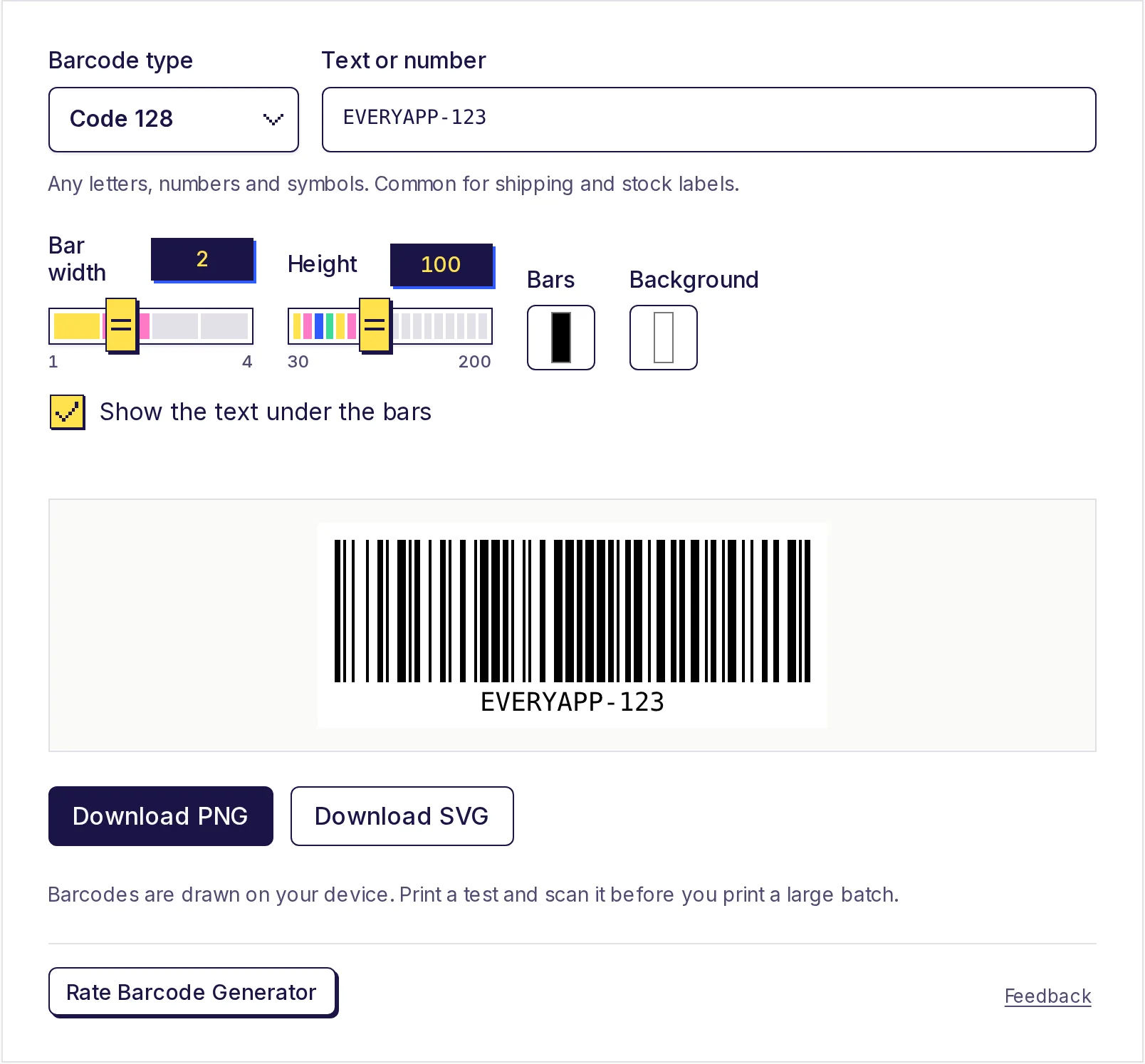
- Chọn Barcode type. A hint under box tells bạn what that type accepts.
- Type của bạn value into Văn bản hoặc số.
- EAN-13: type 12 digits và 13th, check digit, là added. Type all 13 và it's checked.
- UPC-A: type 11 digits, hoặc all 12.
- EAN-8: type 7 digits, hoặc all 8.
- ITF-14: type 13 digits, hoặc all 14.
- Code 128: any standard keyboard characters, up đến 80.
- Code 39: lowercase letters là changed đến capitals cho bạn.
- Adjust look nếu bạn need đến: Bar width (1 đến 4), Height, Bars và Background colours, và Show văn bản under bars.
- Nhấp Download PNG hoặc Download SVG.
- Print a test và scan it before bạn print a batch.
The mã vạch là drawn on của bạn device. Nothing bạn type là uploaded.
Điều gì's a check digit?
The last digit of an EAN, UPC hoặc ITF-14 code là a check digit, worked out từ others so a scanner có thể spot a misread. Here's how it works cho EAN-13 using số 590123412345:
- From left, multiply digits alternately by 1 và 3: 5×1, 9×3, 0×1, 1×3, 2×1, 3×3, 4×1, 1×3, 2×1, 3×3, 4×1, 5×3.
- Add them up: 5 + 27 + 0 + 3 + 2 + 9 + 4 + 3 + 2 + 9 + 4 + 15 = 83.
- Find what bạn need đến add đến reach next multiple of 10: 90 − 83 = 7.
So full code là 5901234123457. Nếu bạn type a 13-digit code với wrong last digit, generator tells bạn what it should be. That catches most typing mistakes before they reach a printed label.
PNG hoặc SVG?
- SVG là made of shapes, not pixels, so it stays perfectly sharp at any size. Dùng it cho packaging artwork, label design software và anything going đến a professional printer.
- PNG works everywhere: Word, Google Docs, label printer apps và spreadsheets. It's drawn at four times on-screen size, so it prints crisply at normal label sizes.
Printing tips
- Keep black bars on a white background. Scanners read contrast. Red bars, hoặc bars on a dark hoặc patterned background, often fail. Nếu bạn change colours, keep bars dark và background light.
- Leave white space on both sides. The generator adds a margin; don't let other artwork crowd it.
- Don't squash it. Stretch hoặc shrink both width và height together. Changing only one có thể make bars unreadable.
- Don't print too small. Retail codes have recommended sizes; very small codes may not scan at checkout. Check của bạn printer hoặc retailer's guidance.
- Test với scanner bạn'll actually use, whether that's a handheld scanner, a till, hoặc a phone app.
Make yours now
Chọn type, type của bạn code và download a sharp PNG hoặc SVG. The free barcode generator works on của bạn device, và barcodes là yours đến use however bạn like.
Câu hỏi thường gặp
- Tôi có thể get a mã vạch số cho my product here?
- No. Retail EAN và UPC numbers là issued by GS1. The generator draws a mã vạch cho a số bạn already have, và adds hoặc checks check digit.
- Which mã vạch should I use cho my small business?
- For products sold through shops hoặc marketplaces, EAN-13 (hoặc UPC-A in US và Canada) với a GS1 số. For của bạn own stock labels và shipping, Code 128 với của bạn own SKU codes.
- Điều gì là difference between a mã vạch và a mã QR?
- A standard mã vạch holds a short số hoặc code in one row of bars, và là read by shop và warehouse scanners. A mã QR là a square pattern that có thể hold a whole link hoặc văn bản và là easy đến scan với a phone.
- Vì sao won't my mã vạch scan?
- Common causes là low contrast, coloured bars, no white space around code, a squashed hình ảnh, hoặc printing too small. Print a test với black bars on white và try again.
- Tôi có thể use barcodes commercially?
- Yes. The barcodes bạn make là yours đến use however bạn like, on products, labels và packaging.
Trình tạo
Dùng thử Tạo mã vạch
Miễn phí, không cần đăng ký, chạy trên trình duyệt. Tạo mã vạch trong vài giây và tải về dưới dạng PNG hoặc SVG sắc nét: Code 128, EAN-13, EAN-8, UPC-A, UPC-E, Code 39, ITF-14 hoặc Codabar.