Cron Syntax Explained: 5 Fields and Symbols (Free Tool)
Cron syntax in plain English: the five fields, * , - and /, the day-of-month OR day-of-week rule, @daily shortcuts, how Quartz differs, and a free checker.
Published · 5 min read
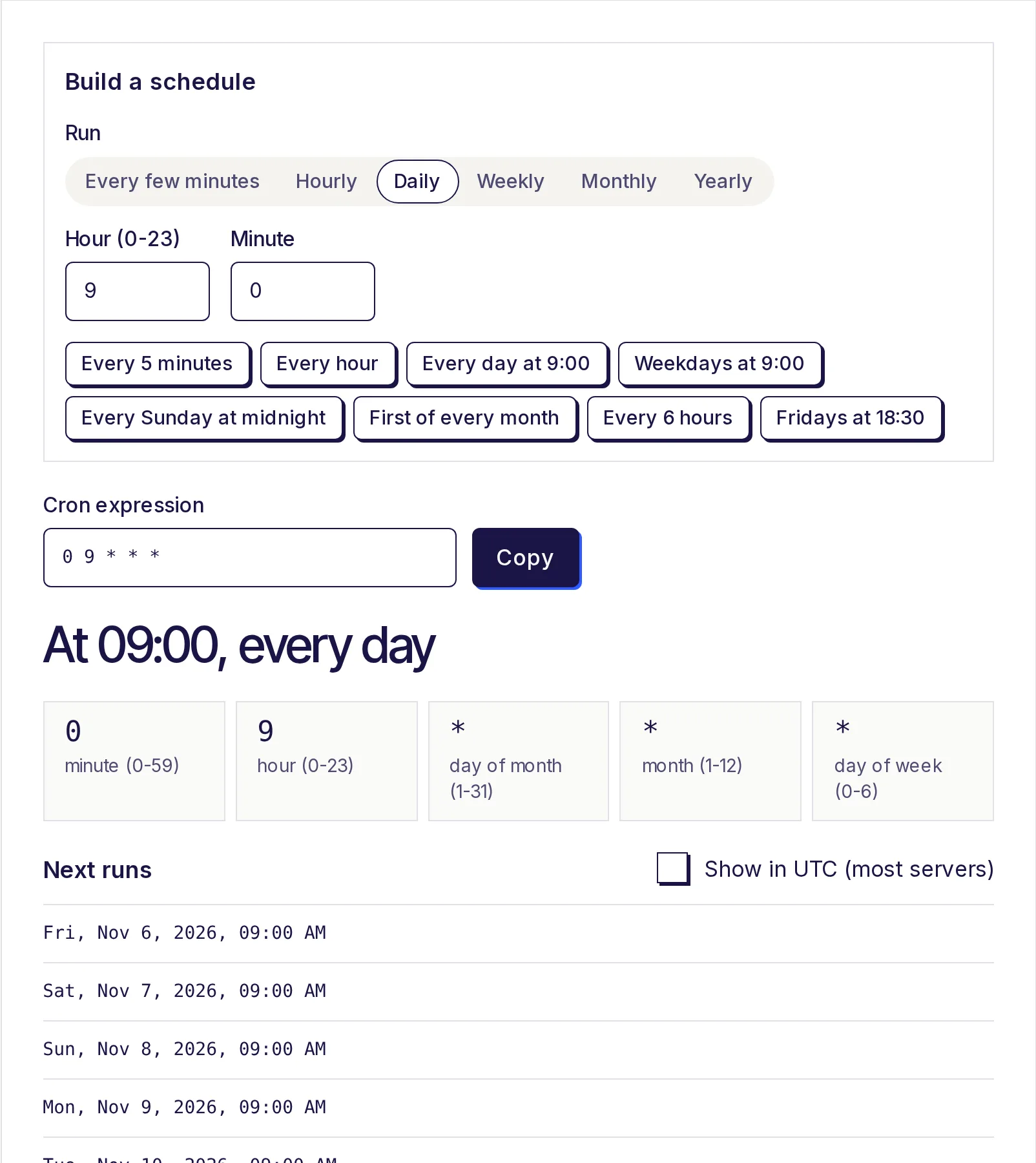
Cron syntax is five fields separated by spaces: minute, hour, day of month, month and day of week. Each field holds a number, a * for "every", or a pattern built from , - and /. So 30 18 * * 5 means 18:30 every Friday. Some schedulers add a seconds field or symbols like L and #, the usual source of confusion. Paste any expression into the free cron expression generator to have it explained in plain English with its next run times.
Cron syntax: the five fields
┌──────── minute        (0-59)
│ ┌────── hour          (0-23)
│ │ ┌──── day of month  (1-31)
│ │ │ ┌── month         (1-12 or JAN-DEC)
│ │ │ │ ┌ day of week   (0-6 or SUN-SAT; 7 is also Sunday)
│ │ │ │ │
* * * * *  command to run
Hours use the 24-hour clock, so 6 pm is 18. Months and weekdays accept three-letter English names in most cron versions: 0 9 * * MON-FRI is the same as 0 9 * * 1-5.
The four special characters
| Character | Meaning | Example | Reads as |
|---|---|---|---|
* |
Every value | * * * * * |
Every minute |
, |
A list | 15,45 * * * * |
At :15 and :45 every hour |
- |
A range | 0 9-17 * * * |
On the hour, 09:00 to 17:00 |
/ |
A step | */15 * * * * |
Every 15 minutes |
You can combine them. 0 9-17/2 * * 1-5 runs at 9, 11, 13, 15 and 17 on weekdays. 0,30 8-10 * * * runs at 8:00, 8:30, 9:00, 9:30, 10:00 and 10:30.
A step counts from the start of its range and restarts each hour, day or month. So */7 in the minute field gives :00, :07 ... :56 and then :00 again, with a 4-minute gap. Our guide on running cron every 5 minutes shows why steps that divide 60 evenly behave best.
The day-of-month OR day-of-week rule
This one surprises almost everyone. When both day fields are restricted (neither is *), standard cron runs the job when either matches:
0 0 13 * 5
You might read that as "Friday the 13th". Cron reads it as "the 13th of every month, and every Friday". The generator spells it out: "At 00:00, on day 13 of the month, and on Friday". If only one day field is restricted, only that one counts, which is what you'd expect.
To get "Friday the 13th", schedule it on Fridays (0 0 * * 5) and have your script check the date.
Shortcuts: @daily and friends
Many cron versions accept these in place of the five fields:
| Shortcut | Same as |
|---|---|
@hourly |
0 * * * * |
@daily or @midnight |
0 0 * * * |
@weekly |
0 0 * * 0 |
@monthly |
0 0 1 * * |
@yearly or @annually |
0 0 1 1 * |
@reboot (run once at start-up) also exists in many Linux crons, but it isn't a schedule, so the generator doesn't accept it.
Extensions: L, W, # and ?
Some schedulers go beyond the standard. The best known is Quartz, used in many Java applications, and its syntax shows up in other tools too. As per the Quartz documentation:
- Seconds come first, and there's an optional year at the end, so expressions have 6 or 7 fields:
0 0/5 * * * ?is "every 5 minutes". - Day of week runs 1-7, with 1 = Sunday, not 0-6.
2is Monday in Quartz but Tuesday in standard cron. ?means "no specific value" and goes in one of the two day fields, because Quartz doesn't allow both to be set.Lmeans "last":Lin day of month is the last day of the month;6Lin day of week is the last Friday.Wmeans the nearest weekday to a date:15Wis the weekday closest to the 15th.#means "the nth":6#3is the third Friday of the month.
The EveryApp generator uses the standard five-field format, so it tells you when you've pasted something else. It accepts ? as a synonym for *, but L, W and # give an error such as "The day of month field "L" has a value outside 1-31.", and a seconds field gives "That has six fields... drop the seconds field."
Platform differences to watch
- Linux cron (crontab): the five-field standard described here, in the server's local time zone.
- GitHub Actions: standard five fields. As per GitHub's documentation (2026), schedules run in UTC unless you set a time zone, the shortest interval is every 5 minutes, and runs can be delayed at busy times such as the start of each hour.
- Quartz and Spring: six or seven fields with seconds first, plus
L,W,#and?. Check the docs for your framework, as Spring's own format differs from Quartz in places. - Cloud schedulers: many use either the standard format or a Quartz-like one, often with their own time zone setting. Always check which your platform expects; pasting a five-field expression into a six-field scheduler shifts every field by one.
The time zone point is the biggest source of "my job ran at the wrong time". Tick Show in UTC (most servers) in the generator to see run times as a UTC server would, or use the time zone converter for a specific city.
Reading an expression, step by step
Take 30 2 * * 1-5:
- Minute
30, hour2: at 02:30. - Day of month
*, month*: any date. - Day of week
1-5: Monday to Friday.
So: 02:30 every weekday. Practising like this gets fast; if you validate cron strings in code, the regex tester is handy for checking a pattern against a list of examples, though a real cron parser is the safer check.
Try your expression
Paste any five-field expression, read the plain-English version and the next eight runs, then copy it. The free cron expression generator works in your browser and needs no account.
Frequently asked questions
- What are the five fields in a cron expression?
- Minute (0-59), hour (0-23), day of month (1-31), month (1-12) and day of week (0-6, where 0 and 7 are Sunday).
- What does */5 mean in cron?
- Every 5th value of that field, starting from the lowest. In the minute field, */5 runs at :00, :05, :10 and so on.
- Is Sunday 0 or 7 in cron?
- Both work in standard cron. In Quartz, days run 1-7 and Sunday is 1, so always check which format your scheduler uses.
- What does ? mean in a cron expression?
- It's from Quartz and means "no specific value" for one of the day fields. Standard cron doesn't need it; the generator treats it like *.
- Why does my expression with both a date and a weekday run too often?
- When both day fields are set, standard cron runs on either one. 0 0 13 * 5 runs on every 13th and every Friday.
- Does cron support seconds?
- Standard cron doesn't; the smallest unit is one minute. Quartz and some other schedulers add a seconds field at the start.
Developer tools
Try the Cron Expression Generator
Free, no sign-up, works in your browser. Build a cron expression by picking how often a job should run, or paste one to see it explained in plain English with its next 8 run times.
Also useful
- Regex TesterTest a regular expression against your text and see every match highlighted as you type, with a table of capture groups (named ones too) and a live find-and-replace preview. It follows JavaScript regex rules, and a pattern that runs too long is stopped instead of freezing the page.
- Unix Timestamp ConverterConvert a Unix timestamp to a readable date and time in any time zone, or turn a date into a timestamp in seconds or milliseconds. Seconds, milliseconds, microseconds and nanoseconds are detected automatically, and you can convert up to 1,000 timestamps at once.
- Time Zone ConverterConvert a time between cities and time zones, like EST to IST or PST to London, with daylight saving applied for the exact date. Compare up to six cities, see who is a day ahead, and use the meeting planner to find an hour that works for everyone.